

Barcode in the E-Folder – Hit or Miss?
Imagine that finding an employee's file is as easy as shopping at Biedronka. A quick scan and the documents are in their place – all thanks to barcodes. They have been used for years to improve and automate processes in stores, warehouses, and production lines. Why not use them in your business?
Barcodes in the e-Folder application. Is it possible?
Absolutely! e-File is a product that enables automation of HR and payroll processes. Barcodes can be an additional factor that speeds up and facilitates work in your company.
What type of barcode do we use in the e-Folder application?
In e-Folder, we use the Code-128. It is a one-dimensional code and the most common marker used to encode information. It takes the form of familiar dark and light bars arranged in a single line.
Code-128 is an alphanumeric code. It uses specific characters defined in the code to record text and numbers represented as digit strings. We can encode any length of text, depending solely on the amount of information to be encoded. The code can be scanned in any direction, which is very convenient.
Code-128 was created to encode 128 ASCII characters (American Standard Code for Information Interchange). Encoding uses bars and spaces of four possible widths.
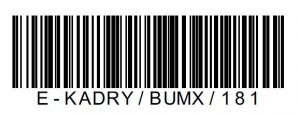
Example barcode in our application:
Where do barcodes in e-Folder come from?
We create barcodes directly in the SAP system.
What are barcodes used for in e-Folder?
Barcodes are used for automatic recognition of the type of document we are working with.
Thanks to this, when entering a new document into e-Folder, the user does not have to select the document type; it will be recognized automatically.
What types of documents are there?
Type means the document type found in the e-Folder application in SAP – for example CV, employment contract or work certificate.
In which cases do we use barcodes?
- During document categorization in the migration process to the SAP system.
- During daily work with the system when scanning documents signed by employees.
How does the process of scanning documents with barcodes work?
Documents that have barcodes are scanned into a folder on the user's computer.
Mechanisms included in our software automatically recognize the personal number encoded in the barcode and the document type and based on that place the document in the SAP system under the appropriate person, in the correct tab, and with the correct type.
The second option is import directly from e-Folder, where using the appropriate button we select only the PDF document and click the import option with barcode recognition.
Barcode in e-Folder – a hit!
Using barcodes is an excellent solution that streamlines processes, reduces labor costs, and shortens the time required to populate the folder. By using barcodes, we primarily save time – and as we know – time is money!
Do you care about streamlining processes in your company? From the next blog article, you will learn how you can sign documents without leaving home!
e-File · efolder · barcodes